How to use a PDF knitting pattern on iPhone and iPad
Photo: Giulia Bertelli / Unsplash
Save the PDF to the Files app first: from Mail, touch and hold the attachment and tap Save to Files; from Etsy or Ravelry, download it in Safari and it lands in Files › iCloud Drive › Downloads. Then open it in the app you'll knit or crochet from, and keep the original in Files as your backup.
Save a pattern from email
Designers and yarn shops often send the PDF as an attachment. Apple's steps for the Mail app:
- Open the email with the pattern.
- Touch and hold the attachment.
- Tap Save to Files, pick a folder and tap Save. (Save Image is for photos and puts them in the Photos app instead.)
The same menu has Share, which sends the PDF straight to another app. Saving to Files first is worth the extra tap: the original stays somewhere you can always find it.
Download a pattern from Etsy
This is the one that catches people out. Etsy's help centre is explicit: "You can't download a digital purchase through the Etsy app at this time." Use Safari instead:
- Open Safari and go to etsy.com (tapping the link in Etsy's email may open the app instead). Sign in.
- Go to your account, then Purchases.
- Next to the order, tap Download Files, then tap the PDF.
Download a pattern from Ravelry
Patterns you buy on Ravelry while signed in are kept in your library. Ravelry's own tip lists the ways back to them: your library (from your username at the top), the purchases page in your notebook, or the "in my library" link on the pattern's page. In Safari, tap the PDF to download it. If you bought it while signed out, look for the email from downloads@ravelry.com, which has the download link.
Find it in Files and keep it tidy
Downloads from Safari go to the Downloads folder. Apple's support article gives the path: open Files, tap Browse, tap iCloud Drive, then Downloads. Safari also shows a Downloads button next to its search field while a download is fresh. If you can't find a file, the search field in Files finds it by name.
Downloads fills up fast. Make one Patterns folder in iCloud Drive with a subfolder per project, and move each PDF there (touch and hold the file, tap Move). Give it a name you'll recognise in a year, like Harbour-socks-pattern.pdf, not download (3).pdf.
Open it in a pattern app, zoom and mark your place
To send a PDF from Files to another app, touch and hold the file, tap Share and pick the app from the share sheet (Apple's guide to sending files from Files). If the app isn't in the first row, scroll the row or tap More.
You can knit from Files itself: pinch to zoom, and use Apple's Markup tools to draw on a PDF. That works, but it doesn't know where you are. Every time you look up you have to find your row again, and a highlighter mark doesn't move when you finish the row.
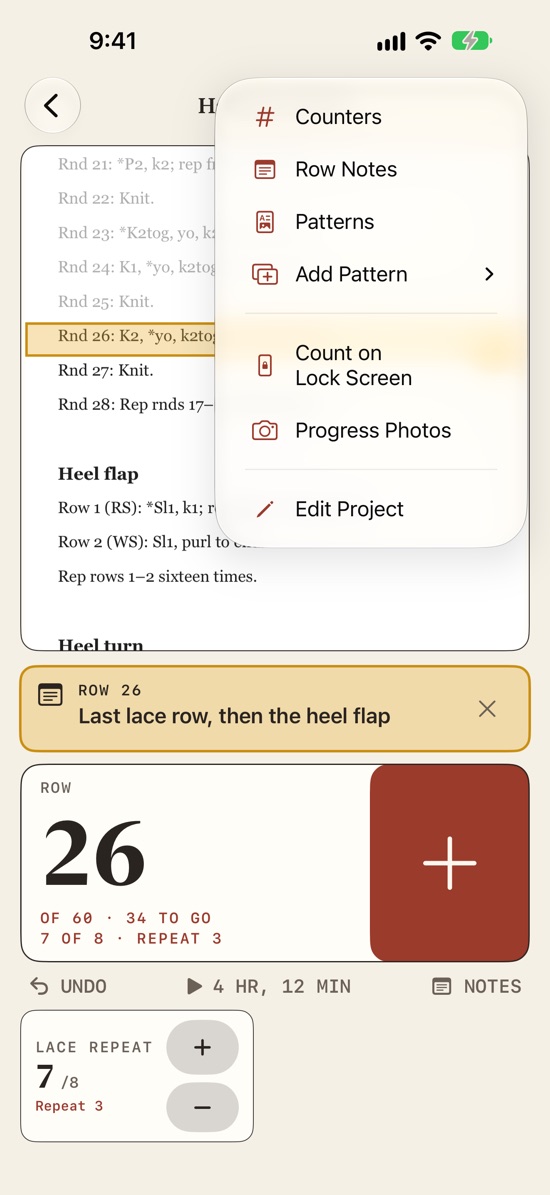
A pattern app does that part for you. In Ballband, you add the PDF to a project (Add Pattern › From Files, or share it to Ballband from Files, Mail or Safari; photos work too and become pages of a PDF). A saffron line sits on the row you're on. It reads the pattern's own row labels, like "Row 12", "Rows 21–28" or "Rnd 3", so when you add a row the line moves to the next row of the pattern, across columns and onto the next page. Rows you've done turn grey. For a chart, you draw a box around it once and the line steps through its rows; Focus on the Line dims everything except the row you're on.
Before installing anything you can try the free Pattern follower in your browser.
Scan a paper pattern
Magazine patterns, leaflets from a ball band, a page from a book you own: you can turn them into a PDF with the iPhone camera. In the Files app, tap the More button (•••), tap Scan Documents, hold the page in view, and Files captures it (in Auto mode it scans by itself). Drag the corners if needed, tap Keep Scan, add more pages, tap Done, then choose a folder and Save. Notes can scan too, from the attachment button in a note.
Tips for a scan you can knit from:
- Flatten the page and scan in daylight; shadows across a row make it hard to read.
- Scan every page of the pattern, including the abbreviations and the chart key.
- Keep scans of patterns for your own use.
Ballband has its own Scan Paper Pattern option under Add Pattern. The text on scanned pages is recognised on the device, so the saffron line can find "Row 1" on a scan as well as on a PDF.
Keep a backup
Patterns you bought can usually be downloaded again from Etsy or Ravelry. Your progress can't: the row you're on, your notes, which repeat you're in. Keep both safe:
- Keep the original PDFs in iCloud Drive, not only inside an app.
- Turn on iCloud Backup: Settings › your name › iCloud › iCloud Backup, then turn on Back Up This iPhone. Apple says it backs up automatically when the phone is locked, on Wi-Fi and on power; Back Up Now does it straight away.
- Export your app's data if it offers it. In Ballband, Settings › Backup › Export Backup saves one file with every project, its counters, patterns, notes and photos. Keep it in Files or iCloud Drive. Restore from Backup adds the projects that aren't on the device and leaves the others alone, which is also how you move projects from an iPhone to an iPad.
Ballband has no account and sends nothing anywhere; your projects and patterns stay on your device and in its backups. That is also why the export matters: it is the copy you control.
Count while your hands are busy
Unlocking a phone with a needle in each hand is the moment people stop counting. A few ways around it:
- Keep the screen on. Ballband has a setting that keeps the screen awake while a project is open.
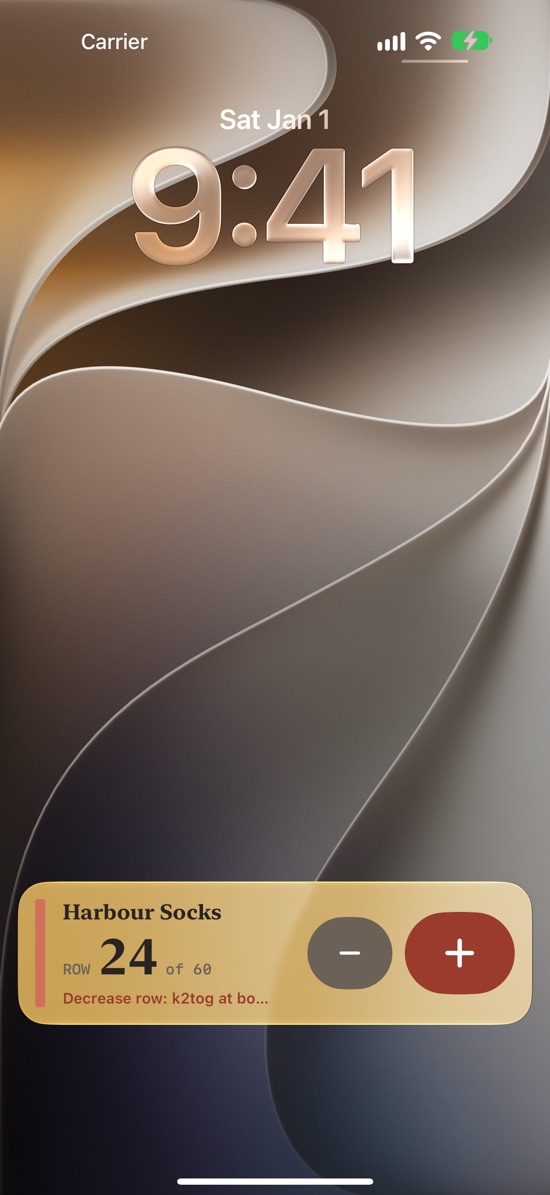
- Count from the Lock Screen. In a project's menu, Count on Lock Screen puts the row, the total and a + and − on the Lock Screen and in the Dynamic Island. A row note shows there too when you reach its row.
- Widgets and Control Center. A Home Screen or Lock Screen widget, or the Add a Row control in Control Center.
- Siri. Say "Add a row in Ballband" without touching the phone.
Counting from the Lock Screen, widgets, Control Center and Siri are part of Ballband Pro.
On iPad there's more room: Ballband shows the pattern on the left and the counters on the right, in portrait or landscape.
Quick answers
Where did my downloaded pattern go?
Open Files, tap Browse, then iCloud Drive, then Downloads. You can also search for the file name in Files, or tap the Downloads button in Safari.
Why can't I download my Etsy pattern in the Etsy app?
Etsy doesn't support digital downloads in its app. Sign in at etsy.com in Safari, go to Purchases and tap Download Files.
Can I scan a pattern without a scanner?
Yes. In Files, tap More, then Scan Documents, and photograph each page. It's saved as a document you can open in a pattern app.
Can I use the same pattern on my iPhone and iPad?
Yes. Keep the PDF in iCloud Drive and add it on both. Ballband doesn't sync projects between devices, so to move a project with its row count, export a backup on one device and restore it on the other.
- Apple: Download email attachments in Mail on iPhone, checked 22 November 2026.
- Apple: Where to find downloads on your iPhone or iPad, checked 22 November 2026.
- Apple: Find files on your iPhone or iPad, checked 22 November 2026.
- Apple: Send files from the Files app on iPhone, checked 22 November 2026.
- Apple: How to scan documents on your iPhone or iPad, checked 22 November 2026.
- Apple: Use Markup on your iPhone, iPad, or iPod touch, checked 22 November 2026.
- Apple: How to back up your iPhone or iPad with iCloud, checked 22 November 2026.
- Etsy Help: How to Download a Digital Item, checked 22 November 2026.
- Ravelry: I Bought A Pattern – How Do I Get To It Again?, checked 22 November 2026.